
Pentarch MediCore · health facility system
The whole facility on one system, with or without internet.
Counter sales, stock, patients, lab, wards and money in one system for pharmacies, clinics and hospitals in Kenya. It runs on a computer inside your facility and records every sale and every stock movement.
- Works offline on the local network
- Cash, M-Pesa, insurance and SHA billing
- One day to install and train
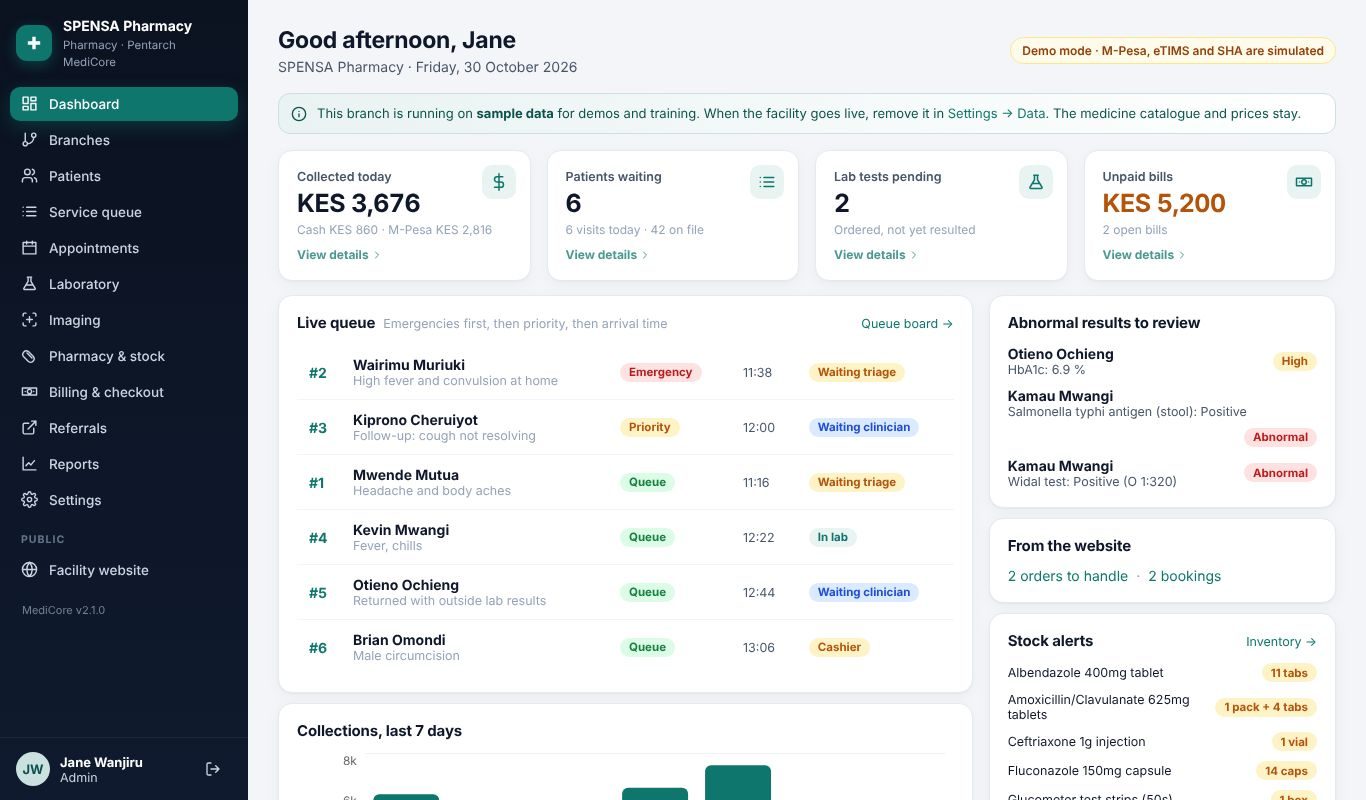

One system, set up for the way you work
Choose your facility type when we install it. MediCore switches on the screens you need and keeps the rest out of the way. Add branches of any type later.
Pharmacies and chemists
A fast scan-and-sell counter
- Barcode and 2D medicine-pack scanning
- Expiry alerts and a reorder list from real sales
- Shifts and cash-up per cashier
- Customer accounts, loyalty points and returns
Clinics and medical centres
The whole patient journey
- Registration, queue, triage and consultation
- Lab requests, results and referrals
- Prescriptions dispensed from the visit
- Bills for SHA, insurance, M-Pesa and cash
Hospitals and nursing homes
Everything, plus wards
- Admissions, wards and bed occupancy
- Maternity and inpatient charges
- Stores, purchase orders and branch transfers
- Several branches on one owner dashboard


who uses it
One system, a screen for every role
Each person signs in with their own PIN and sees only what their job needs.
Owner or administrator
Set up the facility, staff, prices and branches, then go live.
Reception
Register patients, add them to the queue, book appointments and take payments.
Nurse or midwife
Triage, vital signs, wards and the partograph.
Clinical officer or doctor
Consult, order tests, prescribe, refer and admit.
Laboratory
Collect samples, enter and validate results.
Pharmacist
Dispense, sell at the counter and keep stock right.
Cashier
Counter sales, patient checkout and closing the day.
Every action has a name and a time
Owners see who sold what, who changed a price and who opened the drawer, even from another branch. Screens are shown with sample data.
A fast counter that knows your stock
Scan, take M-Pesa, cash, card or account. The receipt prints and stock drops from the right batch, earliest expiry first.
- Barcode scanning, keyboard shortcuts and credit sales
- Discounts that need a supervisor PIN
- Packs and loose units, shelf stock takes
- A witnessed register for expired stock
Every patient, every visit, one timeline
Register a patient once. Each visit moves through the queue, from triage to consultation, lab, pharmacy and the cashier, and stays on the patient's timeline.
- Patient register and search
- Queue and triage with waiting times
- Vitals, notes, diagnoses and appointments
- Referrals out, with results recorded on return

Lab requests and results in the same record
Clinicians request tests from the consultation. The lab works through its own list and enters results with normal ranges on the patient record.
- Lab requests from consultation
- Results with normal ranges
- Printable lab reports
- Tests sent out and results taken back in

Wards, beds and maternity
See which beds are free, admit and discharge, and follow mothers and babies through maternity care.
- Wards and bed occupancy
- Admissions, transfers and discharge bills
- Maternity records
- Inpatient charges
Billing, payments and cash-up
M-Pesa, cash, card, SHA and insurance on one bill, with claims follow-up. Each shift closes with a count of the drawer by note and coin.
- Cash, M-Pesa, card, insurance and SHA
- Unpaid bills list and follow-up
- Shifts, cash-up and expenses
- Receipts and statements

Stock in, and stock between branches
Suggested orders go to suppliers on WhatsApp. Partial deliveries are received against the order, and stock moves between branches in send and receive steps.
- Suggested orders on WhatsApp
- Partial deliveries and what you owe each supplier
- Branch transfers with send and receive steps
- Batch and expiry from the pack's 2D code
The owner's view, across branches
Profit on the real cost of goods, prices below your markup, best and slowest sellers, and each cashier's takings, for any day or month. A daily summary goes to WhatsApp.
- Branches dashboard
- Profit, dead stock and price checks
- MOH reports
- Daily summary on WhatsApp
a day on medicore
From the delivery van to the evening report
A day on MediCore at a pharmacy counter.
Receive stock
Scan the delivery. Batch and expiry fill in from the pack's 2D code and the order is ticked off.
Sell or dispense
Scan, take M-Pesa, cash, card or account. The receipt prints and stock drops from the right batch.
Handle returns
Refunds go back to the original batch, need a supervisor PIN and keep a reason on record.
Close the shift
Count the drawer by note and coin. MediCore shows what should be there and asks about any gap.
Read the numbers
Profit, best and slowest sellers, dead stock and each cashier's takings, for any day or month.
real screens
This is MediCore, not a mock-up
Screens from the demonstration edition with sample patients and staff. Pick a screen to see it.


devices
The MediCore Counter Kit
Tested devices that work together, delivered and installed. Buy MediCore with the complete kit, or let us set it up on the computers you already have. Every item is stocked in Kenya, so a replacement is a day away.
Computer
Renewed business mini PC, Core i5, 8 GB, SSD, 19-inch monitor, keyboard and mouse.
2D barcode scanner
Reads box barcodes and the square codes on medicine packs. Plugs into USB.
Receipt printer
80 mm thermal printer with automatic cutter, USB and network.
Cash drawer
Opens automatically when a cash sale prints.
Power backup
About 15 minutes to finish sales and close safely during a power cut.
Wi-Fi router and paper
For tablets and phones in other rooms, plus receipt rolls to start.
offline first
Your facility keeps working when the line or the power goes
MediCore is a Node.js application installed on a computer inside your facility. Other computers, tablets and phones on your Wi-Fi connect to it. The internet is only needed for M-Pesa prompts, backups and checking the business from outside.
Main computer at the counter
Holds every record. Scanner, printer and cash drawer plug in here.
Facility Wi-Fi
Consultation room, lab and store use tablets or phones. No internet needed.
Internet, when available
Backups, M-Pesa prompts and the owner checking sales from anywhere.
PINs and roles
A cashier never sees the profit report. Every user signs in with their own PIN.
From demo to daily use
Try the online demo
Create your own 30-day demo on this page and set it up as your facility type.
Demo at your facility
We show MediCore with your services, prices and departments.
Install and connect
One day on site for most pharmacies and clinics: we install, import your items and prices, and connect your devices.
Train and go live
Staff get their own PINs and are trained by role. Larger hospitals go live department by department.
free for 30 days
See your own MediCore in one minute
You get a private copy already filled with sample medicines, patients and a month of sales, so every report has something to show. Use it on a phone or computer.
- Make a sale, receive stock, close a shift, read the profit report.
- A Pentarch advisor calls to take you through it.
- If you buy, your demo becomes your live system.
Works with what you already use
M-Pesa
Record M-Pesa payments against bills, alongside cash, card and insurance.
SHA and insurance
SHA and insurance numbers on patients and bills, with claim lists to follow up.
WhatsApp
A daily summary for the owner, and suggested orders sent to suppliers.
Printers and scanners
Receipts, prescriptions, lab results and reports; 2D medicine-pack codes.
Backups
Backups you can restore, kept locally and online.
Sales agents
Agents record clients from their phone and start their demos. Sign in at the MediCore agent portal.
Piloted in two real facilities
MediCore was built with the people who use it, and shaped by their daily work.
A community pharmacy with its own lab
Counter sales, lab tests, minor procedures and referrals out for tests and scans, with results taken back in.
A maternity-focused clinic
A general clinic with inpatient beds, where most admissions are for maternity care.
What facilities ask before they switch
Do we need internet for MediCore to work?
No. The installed system runs on your own computer and keeps working with no internet. When there is a connection it sends M-Pesa payment prompts, backs up and lets the owner check sales from elsewhere. The free online demo does need internet.
What does the 30-day demo include?
A private online copy of MediCore, set up for your facility type and filled with sample data. If you buy, your demo becomes your live system and we install it at your facility.
Can we use the computers we already have?
Yes. Any Windows computer with 4 GB of RAM or more will run it. We install it on your machines and connect your printer and scanner.
How long does it take to start?
One day on site for most pharmacies and clinics: we install, import your item list and prices, set up staff PINs and train the team. Larger hospitals are planned department by department.
Is our data ours?
Yes. It is stored on your facility computer, with backups you can restore. If a plan lapses, after a 7-day grace period the system becomes read-only: you can view and print everything, but new entries pause until the plan is renewed.
Does it handle SHA and insurance?
MediCore records SHA and insurance numbers on patients and bills and produces claim lists. Direct electronic submission depends on certification and integration approvals; ask us for the current status before you buy.
Can the owner see several branches?
Yes. Add branches of any type under one account. The owner sees all of them together or one at a time, and can move stock between them.
See MediCore with your own services
Tell us about your facility and a time that suits you. We will show you MediCore at your premises or online.
- Set up for your facility type
- Your services, departments and prices
- No obligation
Or email info@pentarchcommunications.com. You receive a written quote after the demo.