
Pentarch Portal · college management
One record for each student, from the first application to the alumni list.
A complete management portal for schools, colleges and training centres, running inside your own website. Applicants become students the moment their admission fee is confirmed, and everyone gets a dashboard that fits their role.
- Live at a college in Machakos
- A dashboard for every role
- Runs inside your WordPress website
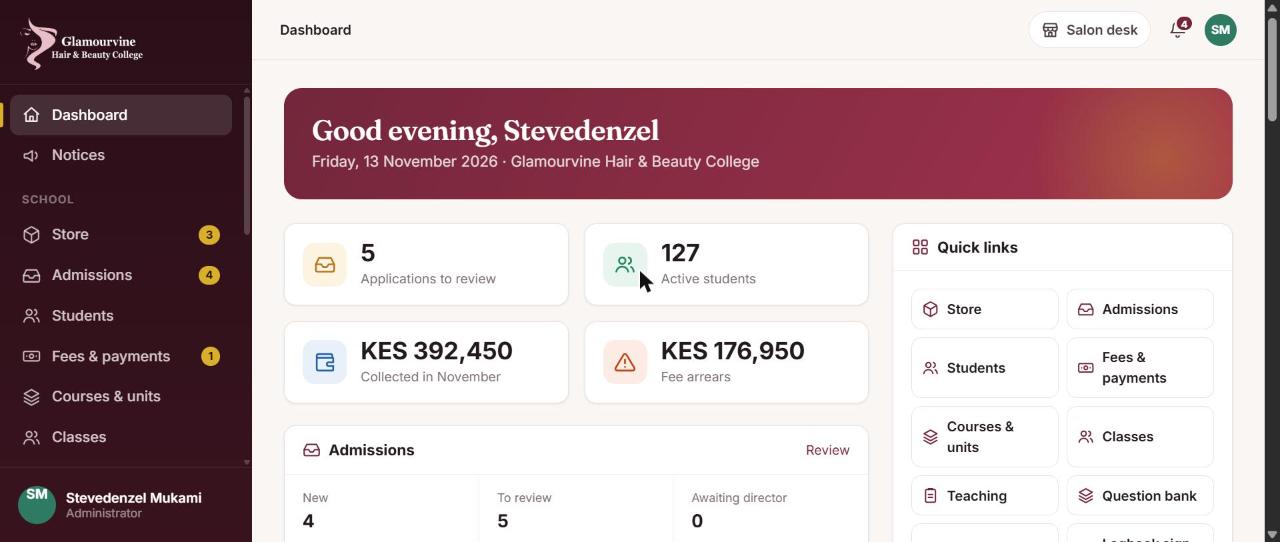

Every office in the college, on one record
Admissions, finance, teaching, the hostel and the students themselves work from the same information, so nobody re-types a name or chases a receipt.
Applications that become students
Applications come in from your website with documents attached. Admission numbers and sign-ins are issued once the admission fee is confirmed against M-Pesa.
- Online application with documents
- Review, offer and activation by the college
- Admission numbers for sign-in
- Fees, receipts and statements, confirmed by M-Pesa

Online learning inside the same portal
Modules and lessons for each unit, with quizzes, CATs and exams drawn from a shared question bank.
- Courses, classes by intake and modules
- Quizzes, CATs and exams
- Question bank for trainers
- Timetables, attendance and printable ID cards

Marks in one gradebook
Online work is marked automatically, essays queue for the trainer, and the gradebook weights CATs and exams into a final result.
- Automatic marking of online work
- Essays queued for the trainer
- Weighted CAT and exam results
- Results approved by the school before release

Practical skills, with evidence
Students record practicals with photo evidence, and trainers sign each one as competent or send it back.
- Photo evidence for each practical
- Sign-off by the trainer
- Competent or sent back, with a note
- A complete logbook at graduation

The rest of college life
Hostel rooms and beds, a store for class materials, and notices to students and staff.
- Hostel rooms, beds and requests
- One store for the school and the salon
- Low-stock alerts
- Notices to everyone, students or staff

Certificates anyone can check
Approve graduands, print the list, hold the ceremony and print certificates with serial numbers and an online verification code.
- Graduation list and ceremony
- Certificate printing with a QR code
- Certificate register: issued, collected or revoked
- Online check: is this certificate genuine?

Graduates stay connected
Graduates move to an alumni list you can use for job referrals, placements and events.
- Alumni records
- Course and year of graduation
- Job referrals and placements
- Kept in the same portal

the journey
From application to alumni
A student's path through the Portal at Glamourvine Hair & Beauty College, with the screens each person sees along the way.
Step 01 of 12
Applies online
- Applicant
- Office
She applies from the college website and uploads her documents. The application lands in the admissions queue for the office to review and send an offer.
Step 02 of 12
Is admitted
- Office
Accepting the offer turns the applicant into a student, with an admission number, a class and her own sign-in.


Step 03 of 12
Pays fees
- Student
- Office
She sees her balance, invoices and the M-Pesa Pay Bill details. The office sees every payment against her record.


Step 04 of 12
Joins a class
- Office
- Student
Classes run by intake. Orientation opens first, then the units of her course unlock in order.


Step 05 of 12
Learns online
- Trainer
- Student
Trainers publish modules and lessons. She reads, watches and checks her understanding, with her progress shown as she goes.

Step 06 of 12
Sits CATs and exams
- Student
- Trainer
Quizzes, CATs and exams open in the portal, drawing questions from the unit question bank.


Step 07 of 12
Gets her marks
- Trainer
- Student
CAT and exam marks are weighted into a final result. Results stay provisional until the school approves them.

Step 08 of 12
Proves her practical skills
- Student
- Trainer
She logs each practical with a photo. Her trainer checks the evidence and signs it competent or sends it back.


Step 09 of 12
Graduates
- Director
The school approves graduands, prints the list and holds the ceremony.

Step 10 of 12
Receives her certificate
- Graduate
Printed or saved as a PDF, with the official seal, both signatures, a serial number and a QR verification code, plus a full academic transcript.


Step 11 of 12
Is verified by an employer
- Employer
Anyone can scan the QR code or open the link to confirm the certificate is genuine.

Step 12 of 12
Joins the alumni
- Graduate
- Office
Graduates stay on the alumni list for job referrals, salon placements and events.
the certificate
A certificate employers can check in seconds
Every certificate the Portal issues carries its own proof. Here is a real one, as the graduate prints it.
- 1Name, award and classification
- 2Principal's and Director's signatures
- 3Official college seal
- 4Serial and admission numbers
- 5QR code for instant verification

Is this certificate genuine?
Scan the QR code
Every certificate printed from the Portal carries its own QR code.
Open the verification page
The code opens the college's verification page for that certificate.
See the record
The page confirms the graduate, course and date as recorded by the college.
the student's view
What a new student sees when she signs in
A Diploma in Beauty Therapy student in her first month, on her own account.


trainers and graduates
Teaching, signing off, and the certificate at the end
The same portal from a trainer's sign-in, and from a student who has finished her course.


The rest of the office, too
Screens from the college office, shown as they run at Glamourvine.


dashboards by role
Each person sees exactly what they need
Four kinds of dashboard, one record underneath.
Principal and admin
- Dashboard of the whole college
- Admissions and student records
- Graduation and certificates
- Reports and an audit log
Finance and office
- Fees, M-Pesa and receipts
- Balances by class
- Hostel and store
- Notices
Trainers
- Modules, lessons and quizzes
- Marking and the gradebook
- Attendance registers
- Logbook sign-off
Students
- Lessons and assessments
- Results and fee statements
- Practical logbook with photos
- Certificate and alumni record
in use
In use at Glamourvine Hair & Beauty College, Machakos
The Pentarch Portal replaced a generic learning system at Glamourvine. Applications, admissions, fees and practical work now run inside the college website, and the college salon runs on Pentarch BeautySuite alongside it.
The college salon
Glamour by Beth runs on Pentarch BeautySuite, sharing one store with the college.
See BeautySuiteScholarship programmes
Charities that sponsor students use Pentarch EduSponsor, in use at SAM Elimu Charity.
See Pentarch EduSponsorSetting up your college
Demo
We show the Portal set up with your courses and fee structure.
Install
The plugin goes on your college website. We can build the website too.
Load your college
Courses, classes, trainers and current students are imported from your spreadsheets.
Train and run
Staff are trained by role; students sign in with their admission number.
What schools ask
Do we need a new website?
No. The Portal runs inside a WordPress website. If your current site is WordPress we add it there; if not, we can build or move your site at the same time, with Live Edit inside.
Can it fit a school, not only a college?
Yes. Terms, classes, units and fees are configured for your institution, whether a school, college, TVET or training centre.
How do students sign in?
With the admission number the college issues on activation. New applicants register online.
Can parents or sponsors pay fees?
Yes. Fees can be paid by M-Pesa by anyone, and the payment is matched to the student's record and statement.
Can we bring our existing student records?
Yes. We import students, classes and balances from spreadsheets so you start with a complete record.
Can we use our own certificate design?
Yes. The certificate is designed for your college, with the verification QR code added.
See the Portal with your courses
Tell us about your college. We will show you the Portal with your own courses and fees.
- Set up for your courses and intakes
- Works on your college website
- No obligation
Or email info@pentarchcommunications.com. You receive a written quote after the demo.